

4 Years of Service
- Allow others to update?
- yes
- Developer Name
- NA
- Developer Links
- na
- Version
- NA
- Latest Update
- Mar 8, 2026
- Release Date
- Mar 8, 2026
- Language
- eng
- OS
- Windows
*************** You can copy and Past this as a guide ****************
(Cover Art goes here)
Overview:
(Game/Description Here...)
*** IMPORTANT NOTE: REMOVE THE "#' SYMBLE IN THE BRACKET TO ACTIVATE THE SPOILER , AND THIS WARNING LINE ALSO***(Cover Art goes here)
Overview:
(Game/Description Here...)
[#SPOILER=Genre:]
IMPLEMENTED AND/OR FUTURE FEATURES. DELETE TEXT IF NOT USED.
[#/SPOILER]
[#SPOILER=Installation]
Extract and run
[#/SPOILER]
[#SPOILER=Change-Log]
CHANGE-LOG HERE. DELETE IF NO CHANGE-LOG AVAILABLE
[#/SPOILER]
[#SPOILER=Dev Notes]
Dev notes here
[#/SPOILER]
DOWNLOAD
Win/Linux: LINK - LINK - LINK- LINK - ETC...
Mac: LINK - LINK - LINK - LINK - ETC...
Android: LINK - MEGA - LINK - LINK - ETC...
(Samples/Screenshots, if more than 7, add them in spoilers with 5-7 shown, DELETE OTHERWISE)
********************** End of Copy and Past Part ********************
==================================== EXPLAINED BELOW =======================================
(Cover Art goes here "DELETE ANYTHING NOT USED")
Overview:
(Game/Mod Description Here...)
Win/Linux: LINK - LINK - LINK- LINK - ETC...
Mac: LINK - LINK - LINK - LINK - ETC...
Android: LINK - MEGA - LINK - LINK - ETC...
(Samples/Screenshots, if more than 7, add them in spoilers with 5-7 shown, DELETE OTHERWISE)
********************** End of Copy and Past Part ********************
==================================== EXPLAINED BELOW =======================================
(Cover Art goes here "DELETE ANYTHING NOT USED")
Overview:
(Game/Mod Description Here...)
Thread Updated: Year/Month/Day (2022-01-31)
Release Date: Year/Month/Day (2022-01-31)
Developer: (for game threads)
Game/Creator: (for mod threads)
Modder: (for mod threads)
Game Version:
Mod Version: (for mod threads)
Language:
NOTE: Below are common spoiler blocks. To add spoiler blocks use [ ] with the word SPOILER in between. If you would like it to have a custom title add SPOILER=YourCustomTitle. like this but without spaces. [ SPOILER ] OR [ SPOILER=YourCustomTitle ] But remove the spaces after and before [ ], unless they are part of your custom title.
Code:
[SPOILER=Genre:]
IMPLEMENTED AND/OR FUTURE FEATURES. DELETE TEXT IF NOT USED.
[/SPOILER]
[SPOILER=Installation]
"Extract and Run"
[/SPOILER]
[SPOILER=Change-Log]
CHANGE-LOG HERE. DELETE IF NO CHANGE-LOG AVAILABLE
[/SPOILER]
[SPOILER=Dev Notes]
Dev notes here
[/SPOILER]
DOWNLOAD
Win/Linux: ANONFILE - MEGA - GDRIVE- WORKPULOAD - ETC...
Mac: ANONFILE - MEGA - GDRIVE - WORKPULOAD - ETC...
Android: ANONFILE - MEGA - GDRIVE - WORKPULOAD - ETC...
(Samples/Screenshots IF ANY AVAILABLE, DELETE OTHERWISE)
Below are some detailed steps for some things.
NOTE: if you copy-pasted the section above make sure to remove the space at the beginning of [ SPOILER] AND [ /SPOILER] or they will not work.
-------------------------------------------------------------------------------------------------------------------------------------------------------------
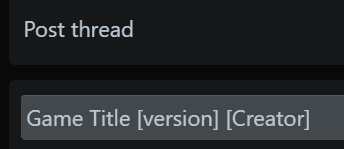
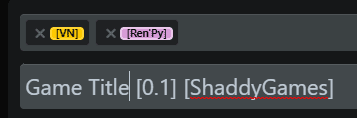
Your game tile and prefixes go here as in the screenshots.


insert all your game tags in the "Tags:" box.

To insert screenshots, start by clicking on
 below.
Once all are uploaded click on

.
The fastest way is to click on "Select all", then de-select your Main image (should be the one on the far left) and click on "Thumbnail".
If you would like your previews to be within a"Spoiler" box, add the top and bottom "SPOILER" lines as in this screen shot.

Win/Linux: ANONFILE - MEGA - GDRIVE- WORKPULOAD - ETC...
Mac: ANONFILE - MEGA - GDRIVE - WORKPULOAD - ETC...
Android: ANONFILE - MEGA - GDRIVE - WORKPULOAD - ETC...
(Samples/Screenshots IF ANY AVAILABLE, DELETE OTHERWISE)
Below are some detailed steps for some things.
NOTE: if you copy-pasted the section above make sure to remove the space at the beginning of [ SPOILER] AND [ /SPOILER] or they will not work.
-------------------------------------------------------------------------------------------------------------------------------------------------------------
Your game tile and prefixes go here as in the screenshots.
insert all your game tags in the "Tags:" box.
To insert screenshots, start by clicking on
Once all are uploaded click on
.
The fastest way is to click on "Select all", then de-select your Main image (should be the one on the far left) and click on "Thumbnail".
If you would like your previews to be within a"Spoiler" box, add the top and bottom "SPOILER" lines as in this screen shot.
Attachments

******************************************************************* CREDITS ( DONOT USE THIS PART ) ********************************************************
Thanks ShaddyGames
Thanks ShaddyGames
Last edited:


